


Splitfun
3.86.00 Reviews
App Specs
- Version
- 0.1.10
- Updated On
- License
- Free
- Downloads
- 50,000+
- Developer
- Forward Silver Limited
- Categories
- Finance
- Platform
- Android
Screenshots
 Analysis by AppCompare
When a group meal ends with one person paying and several people promising to “sort it out later,” it is easy for small amounts to become a source of confusion. I look for expense apps that make the record clear without turning a casual plan into bookkeeping. Splitfun is a finance app from Forward Silver Limited, and its focus is shared spending: recording group costs and working out who owes what. Its appeal is practical rather than flashy, but whether it suits you depends on how your group prefers to track and repay money.
What you can expect to pay
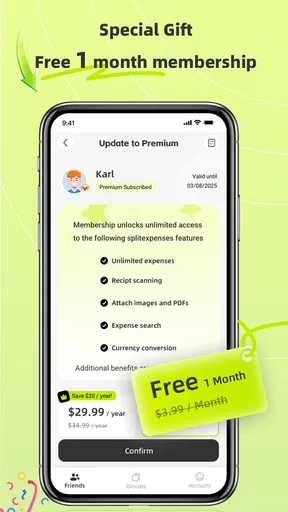
Splitfun is free to download, so you can try its basic approach without paying upfront. It also offers in-app purchases ranging from $3.99 to $34.99 per item. I would treat those as a reason to check the purchase options in the app before committing to a paid tier, rather than assuming a particular tool or upgrade is included at a certain price.
That distinction matters for a group expense app: one person may be happy to pay for extra conveniences, while everyone else only needs to see the shared record. Before asking friends to join, I would decide whether the free experience handles the group’s needs and make sure nobody is counting on a paid option that they have not checked. Splitfun is rated for Everyone, and the app is free to start, but the presence of purchases means “free” does not necessarily describe every available option.
Where the value comes from
The useful thing about a dedicated expense tracker is the shared account of what was spent, not just a final total. A clear record can help a group distinguish a shared grocery run from someone’s personal purchase, and it gives people a calmer way to check the balance before paying one another back. For a trip or recurring shared costs, keeping entries together can be more useful than trying to reconstruct everything from messages and bank notifications after the fact.
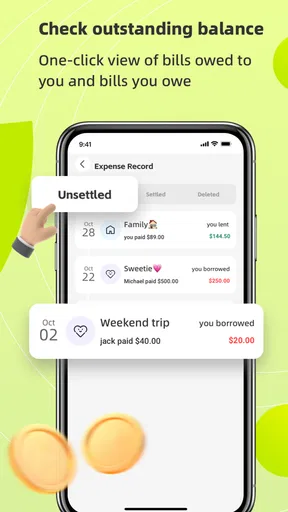
I would use Splitfun as the group’s ledger, while keeping actual payment decisions separate unless the available payment method suits everyone. That small habit prevents a common misunderstanding: recording that someone owes money is not the same as confirming that the money has been sent. A quick check of the expense record and the payment itself can save the organizer from marking a balance settled too early.
Who is likely to appreciate it
Splitfun looks most relevant to people who regularly share costs with a defined group: friends planning a getaway, roommates dividing household purchases, or relatives coordinating a gathering. The app has passed 50,000 installs and holds an average rating of 4.2 from 43 ratings, which suggests it has found an audience, though that is not a guarantee that its workflow will match yours.
It is less compelling if you only split an occasional dinner and your group already handles it cleanly with a calculator and a payment app. In that situation, inviting everyone to adopt another tool may add more friction than it removes. It is also not the right fit for anyone who needs a formal accounting system, business expense controls, or a record that meets a specific tax or compliance process; a casual group tracker should not be mistaken for professional bookkeeping.
Worth Reading Before You Choose

EA SPORTS FC Mobile 26 Is a Bigger Football Game, but It Takes Time

Flipboard Shows What News Apps Must Do Beyond the Feed

Switching to Android Auto Means Rethinking Your Driving Routine

Google Calendar Makes a Crowded Week Easier to Manage

Ludo King Makes the Most of the Minutes Between Plans

Baby Panda World Brings Quick Play to Modern Phones, but Its Game Library Feels Busy
How I would organize a shared expense
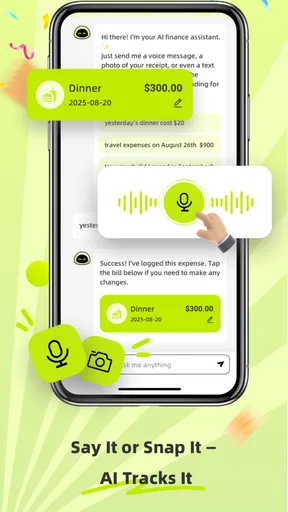
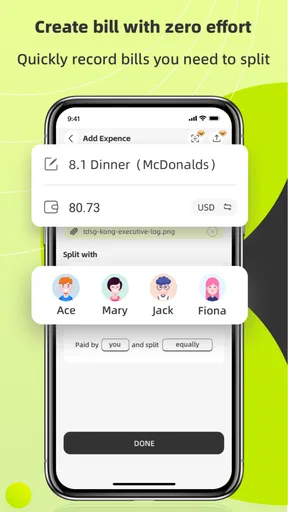
For a weekend away, I would create the group before the first major purchase and agree on what counts as shared. One person might cover groceries, another fuel, and someone else tickets. Adding expenses close to when they happen is easier than trying to remember them on the final evening, while a receipt image, where useful, can help the group check an item later without searching through a camera roll or chat history.
There is a subtle benefit to agreeing on the rules first. A meal that only some people attend, for example, should not automatically be divided across the whole group just because it was paid from a shared pot. I would make the participants clear when recording that cost, then review the balances before settling up. This is not busywork: it prevents a tidy-looking total from concealing an unfair split.
Another practical tip is to nominate one person to keep an eye on duplicate entries. If two friends both log the same supermarket receipt, the group balance can look wrong even though each entry seems reasonable on its own. A quick scan of recent expenses before adding a large purchase is a simple safeguard, especially when several people are contributing during a busy trip.
How it compares with familiar alternatives
A notes app or group chat is flexible, but totals and corrections can get buried among unrelated messages. A spreadsheet gives a careful organizer more control, yet it can feel like a chore on a phone and may require someone to maintain formulas. Splitfun’s purpose-built expense tracking is appealing when the group wants a more direct record without building a system from scratch.
On the other hand, a payment app is usually better at sending money, while a bank transfer can be the simplest choice when everyone already knows the amount. Those tools do not necessarily offer the same shared expense history, but they may be all a small group needs. I would choose Splitfun when tracking several purchases and participants is the hard part, and use a simpler payment method when the only task is reimbursing one person for a single bill.
What is Splitfun All About?
Alright, let’s dive into what Splitfun actually does. At its core, it's designed to make splitting bills and tracking shared expenses super easy. You know how it goes—someone always ends up paying more, and keeping track can be a nightmare. That’s where Splitfun steps in to save the day.
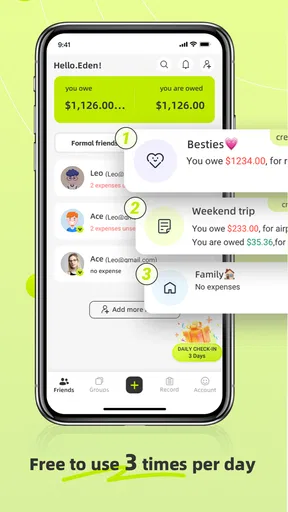
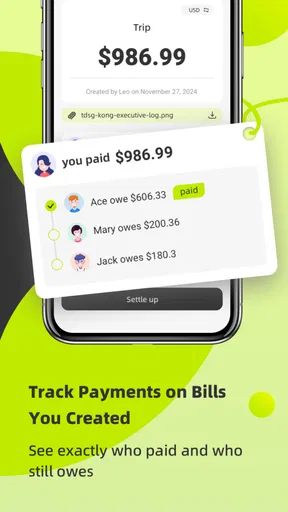
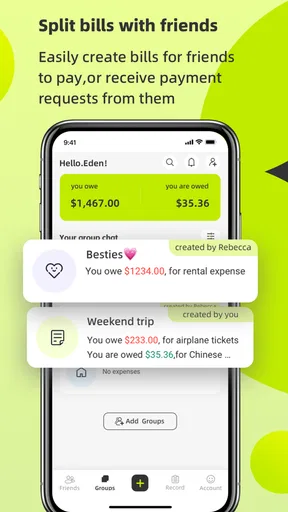
After downloading the app, I was greeted with a clean and intuitive interface. It’s designed to be as straightforward as possible, which is great for those of us who don’t want to spend hours figuring out a new app. You can quickly create a group, add members, and start logging expenses. The app even allows you to attach photos of receipts, which is a neat little feature.
Features that Stand Out
One of the things I love about Splitfun is how it handles currency conversion. If you’re traveling or dealing with international friends, this feature is a lifesaver. The app automatically converts expenses to your preferred currency, ensuring everyone’s on the same page.
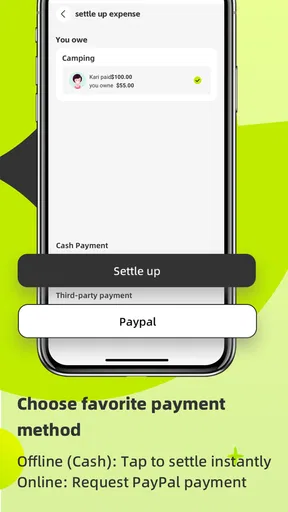
Another nifty feature is the ability to settle up directly through the app. You can use various payment methods, making it incredibly convenient to reimburse your friends without having to switch between apps.
And let’s not forget about the reports. Splitfun generates detailed reports that break down who owes what, so there are no awkward conversations about money. You can also export these reports, which is perfect if you need to keep records for future reference.
Using Splitfun in Real-Life Scenarios
I gave the app a test run during a recent weekend getaway with friends. We were a group of five, and everyone had different expenses to cover. From groceries to gas, everything was logged in Splitfun. It was incredibly satisfying to see everything neatly organized and balanced out by the end of the trip.
The app also came in handy for planning a friend’s birthday party. We had to split the cost of decorations, food, and drinks. Instead of someone fronting the bill and hoping everyone would pay them back, we used Splitfun to keep things fair and square. It was smooth sailing, and everyone appreciated the transparency it brought to the table.
A Few Things to Keep in Mind
While Splitfun is a fantastic tool, it’s worth mentioning that everyone involved needs to download the app for it to work effectively. It’s not a huge issue, but something to consider if you’re planning to use it for larger groups or with people who might not be tech-savvy.
Another point to note is that while the basic features are free, there are premium options for power users. These include advanced analytics and customization options, which could be worth it if you find yourself using the app frequently.
Checking compatibility and choosing carefully
The current version is 0.1.5, and the stated minimum operating-system requirement is 7.0. I would check that the device you plan to use meets that requirement before asking a whole group to join; an expense tool only helps if the people who need it can access it. Since the app’s release was January 15, 2025, it is also sensible to check that you are installing the current version rather than relying on an old saved setup.
A question I would settle with the group beforehand is whether everyone is comfortable using an app to track shared costs. If one person prefers not to install it, you can still have the organizer maintain the record, but the convenience and visibility may be reduced. For a large or changing group, agree on who can add expenses and who will review the final balances so the ledger stays dependable.
My other practical question is how much detail the group needs. For a simple trip, a few clear entries and receipt images may be enough; if you need extensive financial analysis, check whether the paid options actually cover that need before purchasing. The in-app purchase range is broad, so I would compare the specific option shown with the benefit your group expects rather than paying on the assumption that every upgrade is essential.
Wrapping Up
In conclusion, Splitfun is a handy app that makes dealing with shared expenses a breeze. Its user-friendly design, coupled with powerful features like currency conversion and detailed reports, make it a must-have for anyone dealing with group finances. It takes the stress out of splitting bills and ensures everyone is on the same page.
So, next time you’re planning an event or trip, give Splitfun a try. It might just save you some headaches—and maybe even a friendship or two!
My buy-or-skip verdict
I would try Splitfun if my group has several expenses to track, different people are paying, and everyone is willing to keep the record current. Starting free makes that trial relatively low-commitment, while the paid options are worth considering only if their specific extras solve a recurring problem for you. I would skip it for one-off splits, for groups that will not use a shared app, or when accurate accounting and payment handling matter more than a convenient social ledger.
In short, its value is not simply in dividing a bill; it is in giving a group a common place to review the spending before anyone settles up. Used with clear rules and timely entries, that can make a trip or event feel fairer. If your group will not maintain that shared record, a straightforward transfer and a quick message may be the better choice.
Pros
- User-friendly interface for easy navigation.
- Supports multiple currencies for travel.
- Real-time notifications for expenses.
- Customizable categories for detailed tracking.
- Offline mode for on-the-go access.
Cons
- Limited integration with banking apps.
- No option for photo receipts in free version.
- Occasional sync delays between devices.
- Limited data export options.
- Ads in free version can be intrusive.
FAQs for Splitfun
What is Splitfun and how does it work?
Splitfun is a social gaming app designed to entertain and connect people through engaging multiplayer games. It offers a variety of mini-games that you can play with friends or match with online users. The app tracks your scores and achievements, allowing you to compete in leaderboards and share your progress with others.
Is Splitfun available on both Android and iOS devices?
Yes, Splitfun is available for download on both Android and iOS platforms. You can find it on the Google Play Store for Android devices and the Apple App Store for iOS devices. Make sure your device meets the minimum requirements to ensure a smooth gaming experience.
Are there in-app purchases in Splitfun?
Splitfun does offer in-app purchases, which allow users to unlock additional features, cosmetic items, and game expansions. While the core games are free-to-play, these purchases can enhance the overall gaming experience. However, spending is optional, and you can enjoy many features without making any purchases.
How can I play Splitfun with my friends?
To play Splitfun with friends, you need to create an account or log in with your existing social media profiles. Once logged in, you can add friends by searching for their usernames or sending them a game invite. You can then join the same game rooms and enjoy the multiplayer fun together.
Is Splitfun safe for children to use?
Splitfun is designed to be family-friendly and includes features to ensure a safe environment for users of all ages. However, parental supervision is recommended, especially regarding in-app purchases and online interactions. The app also offers privacy settings to control who can interact with your profile.


